
Guides ·
How to write math in Markdown without learning LaTeX
Markdown has no math of its own. Equations in a .md file are written in LaTeX between dollar signs, so a plain text editor shows you something like \frac{v_0^2 \sin 2\theta}{g} instead of a formula. Writing that by hand means remembering commands and counting braces.
You can skip both: open the file in an app that draws the math, and edit the formula as you see it.
The quick way: open the file in Rho MD (free on Windows, Mac and Linux). The formulas show as real math. Turn on editing, click a formula and type.
Download Rho MD — freeHow math is written in a .md file
A ball thrown at speed $v_0$ lands at a distance

$$R = \frac{v_0^2 \sin 2\theta}{g}$$
One $ on each side is a formula inside a sentence. Two $$ on each side put it on its own line. You don't need to type any of this yourself; it's just what is in the file.
See the formulas
Open the .md file in Rho MD: double-click it, or drag it into the window. The formulas are drawn as math, inline ones inside the text and $$ ones centred on their own line.
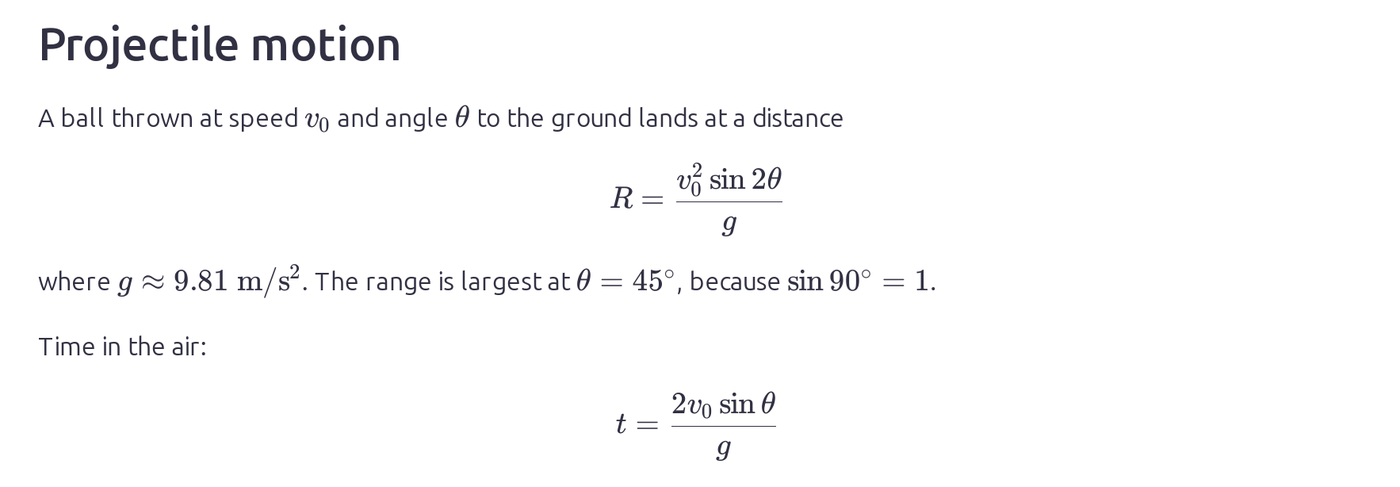
Change a formula without writing LaTeX
1. Turn on editing. Click the pencil button at the top right.
2. Click the formula. It opens right where it is, with the cursor where you clicked. Type to change it; the arrow keys move around, and ↑ ↓ jump between the top and bottom of a fraction.
3. Press Enter (or click Done) to put it back in the document. Esc cancels.
Type a new formula
Press Alt+= (on a Mac, Control+=). On an empty line you get a formula on its own line; in the middle of a sentence you get one inside the text. You can also type / at the start of a line and pick Formula, or right-click and choose Insert Formula.
Then type it the way it looks. Typing E=1/2, a space, and mv^2 gives this:

| Type | You get |
|---|---|
/ |
a fraction: what's just before it goes on top, and the cursor moves to the bottom |
^ |
a power (superscript) |
_ |
an index (subscript), like the 0 in v₀ |
| space | steps out of a fraction, power or index |
\ and a name |
a command or symbol: \alpha, \sqrt, \sum, \int … a list shows matches as you type |
| Enter | done |
Symbols you can't type
Click ∑ on the formula bar. The top row has the structures: fraction, square root, powers and indices, sums, integrals, limits, brackets, matrices, cases and aligned lines. Below are tabs for Greek letters, relations, operators, arrows, sets and logic. Click one and it goes in where the cursor is.
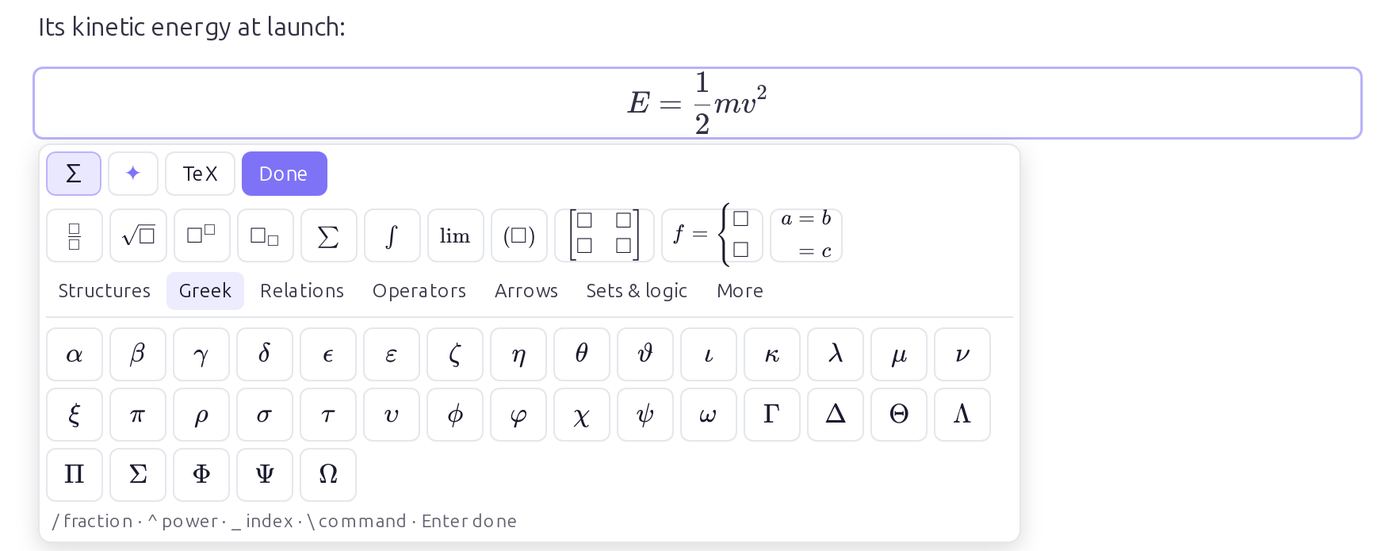
Already know LaTeX? Click TeX to type it directly, with a live preview.
What ends up in the file
Rho MD writes ordinary LaTeX back into the file, so it stays a normal Markdown file that other apps can read. Formulas you didn't touch are left exactly as they were. To see the text, switch on Raw at the bottom right while editing:
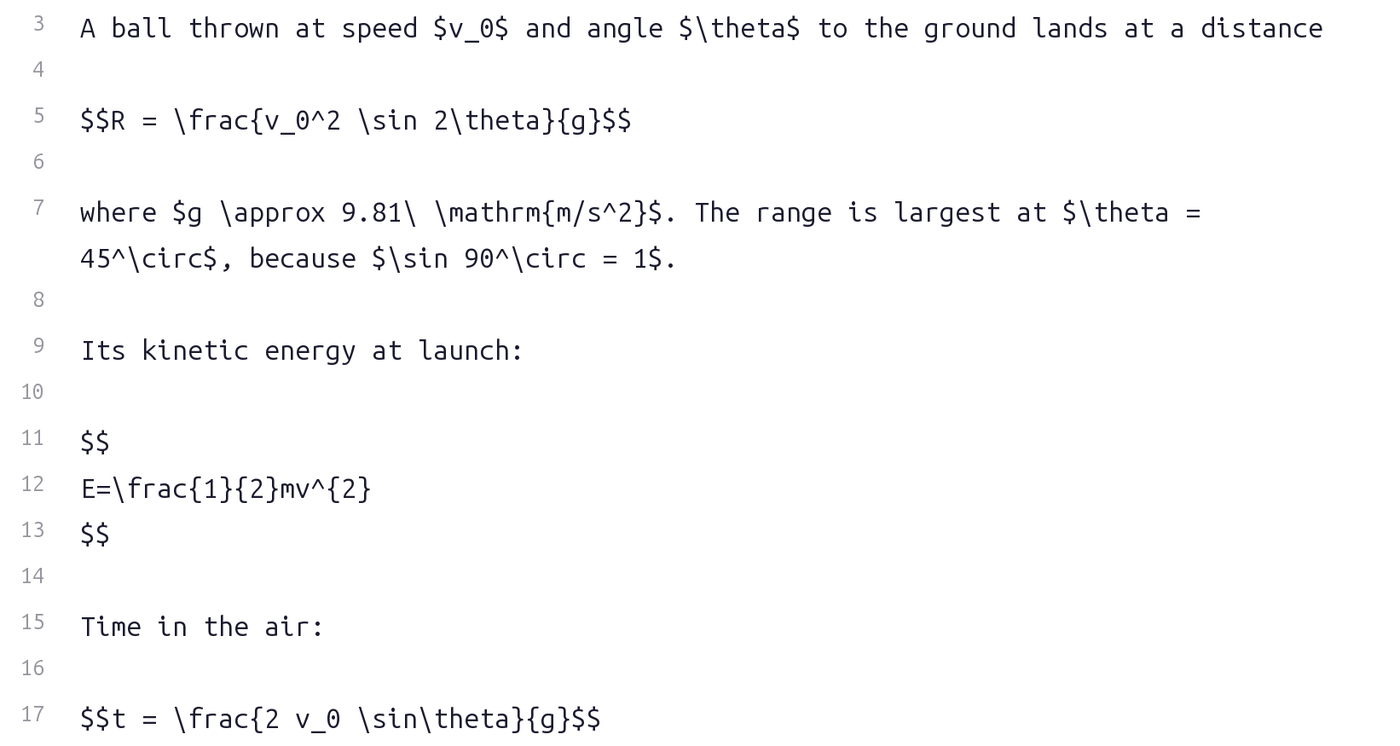
Need to hand it in or send it? You can turn the note into a PDF on Windows or Linux, and the formulas come out as they look on screen.
Questions
Do I need to know LaTeX?
No. You click a formula and type into it the way it looks. Rho MD writes the LaTeX into the file for you. If you already know LaTeX, the TeX button lets you type it directly, with a live preview.
Will the file still work in other apps?
Yes. Rho MD saves formulas as ordinary LaTeX between dollar signs, the way Markdown math is normally written, so other Markdown apps that show math can read it. Formulas you did not change stay exactly as they were.
What is the difference between $ and $$?
One dollar sign on each side puts a small formula inside a sentence. Two on each side put the formula on its own line, centred. In Rho MD, Alt+= in the middle of a sentence inserts the first kind; on an empty line it inserts the second.
How do I type Greek letters and symbols?
Click the ∑ button on the formula bar for a panel of structures and symbols, or type a backslash and the name, for example \alpha or \sum, and pick from the list.
Is it free?
Yes. Rho MD is free and works without an account.
Which computers does this work on?
Windows, Mac and Linux, in Rho MD 1.4.18 or later.
More than Markdown. Read, write and organize notes, formulas included. Rho MD is free.
Download Rho MD — free